

Session, Not Sign-In: What MFA Leaves Unchecked
MFA and Conditional Access decide at sign-in; the token lives for hours or days. What CAE, token protection and revocation cover, and what they miss.
MFA and Conditional Access decide at the sign-in. The tokens that decision produces then carry the identity for between one hour and 28 hours at the resource, with a refresh token behind them that lasts up to 90 days of inactivity and has no maximum age at all. Continuous access evaluation (CAE), token protection and session revocation each narrow that window. None of them covers all of it, and each leaves a different part uncovered.
The rest of this post is the arithmetic behind that, taken from Microsoft's own pages as they stood on 30 October 2026, followed by four changes you can make against your own tenant.
If your last identity project was an MFA rollout, a passkey migration or a Conditional Access baseline such as the one in Conditional Access policies that actually work, this is not an argument that it was wasted. It is an argument that all of it happens at the start of a session, and that the rest of the session is governed by something else.
How long a sign-in is trusted for
Start with the access token, the thing a client presents to Exchange Online or SharePoint Online on every request. Microsoft's two relevant pages disagree slightly on its default life, so I quote both.
The continuous access evaluation page says:
By default, access tokens are valid for one hour, when they expire the client is redirected to Microsoft Entra to refresh them.
The configurable token lifetimes page says:
When issued, an access token's default lifetime is assigned a random value ranging between 60-90 minutes (75 minutes on average).
Treat those as one number with some jitter: an hour, give or take. That is the baseline, and it is the part most people have in their heads when they say tokens are short-lived.
The baseline stops applying when continuous access evaluation is in play. The same CAE page says:
Token lifetime increases to long-lived, up to 28 hours, in CAE sessions.
The token lifetimes page words it as "may be automatically extended to 24-28 hours, when it is safe to do so". The two figures differ at the bottom, so I would plan for the 28 hours as the ceiling and not rely on the 24. The trade is deliberate. Microsoft extends the lifetime because it can now cut a token off early. A long-lived token in a CAE session is only as safe as the revocation signals that reach the resource.
Behind the access token sits the refresh token, the credential the client uses to get the next one without asking the user for anything. The token lifetimes page documents its defaults in a table headed "not configurable":
| Property | Default |
|---|---|
| Refresh token max inactive time | 90 days |
| Single-factor and multi-factor refresh token max age | Until-revoked |
| Single-factor and multi-factor session token max age | Until-revoked |
The same page adds that non-persistent session tokens have a max inactive time of 24 hours and persistent ones 90 days, and that each use extends the validity by the same period. A refresh token that is used at least every 90 days has no end date. Revocation, which a password reset or disabling the account also triggers, a Conditional Access policy that fails when the token is redeemed, and a sign-in frequency policy are what end it.
Microsoft also says you cannot tune this with a token lifetime policy: "As of January 30, 2021, refresh and session token lifetimes are no longer configurable through token lifetime policies." The control it points to is Conditional Access sign-in frequency, which the baseline in the earlier post sets to four hours for sensitive apps and for privileged roles. Sign-in frequency forces the user back through the sign-in. It does not do anything to a token that is stolen and replayed between those prompts, because the thief is not the one being prompted.
So the window is an hour or so for a plain access token, up to 28 hours for a CAE session, and 90 days of inactivity, with no ceiling on total age, for the credential that mints more of them. The figure below puts the three lifetimes in one place and marks the part each control covers.
What a stolen session looks like in numbers
Authentication strength does not shrink that window, because the window opens after authentication has succeeded. The most useful recent number comes from Okta's analysis of an infostealer dump released on a Telegram channel on 2 August 2026. It covered 5,871 infected machines. Okta found 44,791 unique JWTs and 2,937 JWE structures, and reported: "When the infostealer data set was released on Aug. 2, 2026, 1,843 JWTs and JWEs had not yet expired."
For Microsoft specifically, Okta's table gives 2,491 unique authentication tokens in the Netscape cookie format, 1,763 of them unexpired on 2 August, across 1,753 distinct machines. Three cautions apply, and the post is poor without them:
- The row is labelled "includes Entra and consumer", so it is not an Entra figure.
- Okta says its study focused on session tokens and API keys for AI providers, so it is not a census of Microsoft sessions on those machines either.
- Unexpired is not the same as usable. Okta itself lists reasons a replay might fail, such as an organisation locking out breached accounts or restricting access to a known IP range.
What the number does show is the shape of the problem. Okta's conclusion is the sentence I would put in front of anyone who thinks the passkey rollout closes this:
Stronger authentication and the use of phishing-resistant technologies such as passkeys has made username-and-password takeovers harder, but it does not stop a stolen session token or API key.
Okta also describes anti-detect browsers that load stolen browser storage and use proxies "enabling them to bypass 'impossible travel' detections". If your session defences consist of a risk-based sign-in policy and an impossible-travel alert, those are checks on the moment of sign-in and on the geography of the replay, and the replay can be routed to look local.
Okta saw no stolen Okta sessions in that dump. I mention it because the figure is about other providers' tokens, and I have no evidence from this dataset about any particular Entra tenant.
What continuous access evaluation covers
Continuous access evaluation is Microsoft's answer to the long window: instead of shortening tokens, let the resource and the token issuer talk. Microsoft is blunt that it tried the other approach, shortening lifetimes, and "found they degrade user experiences and reliability without eliminating risks."
The critical events it evaluates, from the CAE page, are:
- the user account is deleted or disabled
- the password for a user is changed or reset
- multifactor authentication is enabled for the user
- an administrator explicitly revokes all refresh tokens for a user
- high user risk is detected by Microsoft Entra ID Protection
The page says critical event evaluation "doesn't rely on Conditional Access policies so it's available in any tenant". It adds a second scenario, Conditional Access policy evaluation, where Exchange Online, SharePoint Online, Teams and Microsoft Graph synchronise key policies such as network location so the resource can enforce them itself.
Now the part that matters for the claim: where it does not reach. The page's support tables show the following for the combinations I would expect an estate to care about.
- Office web apps against SharePoint Online: not supported, with a footnote that "token lifetimes for Office web apps are reduced to 1 hour when a Conditional Access policy is set". Office web apps against Exchange Online: not supported.
- OneDrive Win32 and OneDrive Mac against SharePoint Online: not supported. OneDrive web, iOS and Android: supported.
- Teams, on every platform and against Teams, SharePoint Online and Exchange Online: partially supported. The page adds that calls and chat services "don't adhere to IP-based Conditional Access policies".
- Claim challenge support for the Office row on the web: not supported.
Two further limits are in the page's own limitations section. Policy changes and group membership changes made by administrators "could take up to one day to be effective", because of replication between Entra and resource providers. Microsoft says some optimisation reduces policy updates to two hours but "it doesn't cover all the scenarios yet." And the page's workaround when you need a change to apply to a user immediately is to revoke that user's sessions.
One more recent item shows the same pattern at the edge of the product. Message Center notice MC1472591, published 15 September and updated 29 September 2026, says Outlook attachments now run as a separate application configuration that inherits the Conditional Access policies scoped to Exchange and Office, and that "Continuous Access Evaluation is not included in the initial rollout but will follow up soon." Lower down: "CAE isn't supported for this new application configuration yet." The scope is Outlook on the web and the new Outlook. So a new enforcement path shipped with the policy check at sign-in and without the continuous check, and Microsoft said so in writing. I read this through the mc.merill.net archive, because Message Center itself needs a tenant sign-in, so treat it as a mirror reading.
None of that makes CAE a poor control. For the clients and resources it covers, it turns a day-long window into minutes: near real time, which Microsoft says can still mean up to 15 minutes of event propagation. It does not support guest users. The mistake is to assume "CAE is on" means every session in your tenant is covered. It means the sessions between a supporting client and a supporting resource are.
What token protection covers
CAE shortens how long a stolen token works after something changes. Token protection tries to stop the stolen token working at all. The Conditional Access page describes it as "a Conditional Access session control that attempts to reduce token replay attacks by ensuring only device bound sign-in session tokens, like Primary Refresh Tokens (PRTs), are accepted".
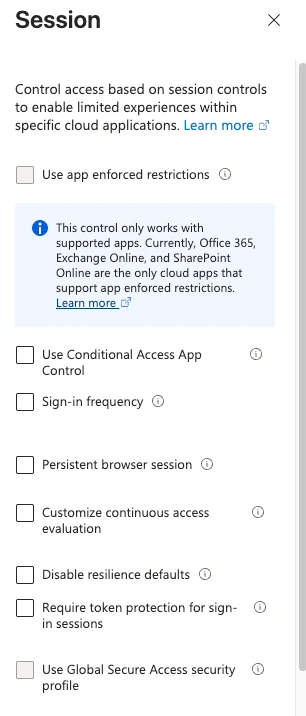
The coverage is narrow, and the page is plain about it:
- Native applications can be protected against three resources: Exchange Online, SharePoint Online and Microsoft Teams. On Windows, Azure Virtual Desktop and Windows 365 are also supported.
- For browser-based applications, support is "currently limited to selected web apps, browsers, and device configurations that access Azure Resource Manager", in preview. On iOS and iPadOS, browser-based applications are "Not supported".
- Windows needs devices that are Entra joined, hybrid joined or registered. The Apple platforms need the Microsoft Enterprise SSO plug-in and MDM-managed devices.
Put that beside the Okta description of the problem. The stolen artefacts there are cookies and browser storage. A control that binds native-app sign-in sessions to a device is not a control on a session cookie held by a browser on an unmanaged machine, except in the one preview path to Azure Resource Manager.
The page also contradicts itself, and I would rather say so than pick a side. The platform availability table lists native applications on iOS / iPadOS and macOS as "Generally Available". The supported devices section, two headings further down, introduces the same platforms as "Apple (Preview)". I do not know which is current. Check the page before you plan around either label.
Microsoft frames token protection as one layer in a broader defence against token theft, not a stand-alone answer. Its own deployment advice is to start in report-only mode, capture interactive and non-interactive sign-in logs, and pilot with a small group, because incompatible apps and devices break.
What revocation covers
Revocation is the control everyone already has, and the one the account-compromise runbook relies on. Microsoft documents what it does on the revokeSignInSessions page: it "invalidates all the refresh tokens issued to applications for a user (and session cookies in a user's browser), by resetting the signInSessionsValidFromDateTime user property to the current date-time."
Two details from that page matter for response time. First: "After you call revokeSignInSessions, there might be a small delay of a few minutes before tokens are revoked." Second, the call "doesn't revoke sign-in sessions for external users, because external users sign in through their home tenant."
What it acts on is the refresh token and the session cookie. The access token already in the client's hand is a separate matter. For a CAE-aware client and resource, the CAE page describes revocation as a critical event that the resource receives, so access ends within minutes, with the same qualifier of up to 15 minutes of event propagation. For a pair that is not CAE-aware, Learn does not say what happens to an unexpired access token, and I have not tested it. My reading is that it keeps working until it expires, which is up to an hour or so for a plain token, but that is inference from the design, not a quoted statement. Test it before you promise it in a runbook.
Revocation also does nothing about a credential that is not a session. If the attacker used a stolen token to register a new authentication method, revoking sessions leaves it in place. That case is covered in Enrolment Is the New Perimeter, which looks at gating the registration itself, and in Entra passkey migration: the default problem.
What to change now
-
Write down the window for your tenant. Take the three numbers from the Microsoft pages quoted above: an hour or so for an access token, up to 28 hours in a CAE session, 90 days inactive for the refresh token. Then ask which of your sensitive apps get the long CAE lifetime, and whether you are comfortable with that being enforced by revocation signals alone.
-
List the coverage gaps for your clients. Take the CAE support tables and mark which of Office web, OneDrive desktop, Teams and the Outlook attachment path your users actually use. The ones marked unsupported or partial are where a stolen token lives out its full lifetime. For Conditional Access policy changes, plan on the one-day replication delay for anything you change in an emergency, and revoke sessions as well.
-
Decide where token protection applies. It is narrow, so choose deliberately: privileged users on Windows devices using the native Exchange, SharePoint and Teams clients is the realistic first scope. Build the policy in report-only mode first and read the non-interactive sign-in logs before you enforce. Conditional Access session controls, including token protection and sign-in frequency, need Microsoft Entra ID P1; CAE critical event evaluation works in any tenant.
-
Make revocation a tested runbook step with its delay written next to it. The commands below read the revocation timestamp on a user, revoke, and read it again. They are syntax-checked but have not been run against a tenant.
Connect-MgGraph -Scopes "User.Read.All", "User.RevokeSessions.All"

$upn = "[email protected]"
$before = Get-MgUser -UserId $upn -Property Id, UserPrincipalName, SignInSessionsValidFromDateTime
$before.SignInSessionsValidFromDateTime

Revoke-MgUserSignInSession -UserId $before.Id

$after = Get-MgUser -UserId $upn -Property Id, UserPrincipalName, SignInSessionsValidFromDateTime
$after.SignInSessionsValidFromDateTime
signInSessionsValidFromDateTime is the property the revoke call resets, and the user resource page describes it as the time before which refresh tokens and session tokens are invalid. If the second timestamp is not later than the first, the revoke did not take, and you want to find that out in a test, not during an incident. User.RevokeSessions.All is the least privileged delegated permission the cmdlet page lists for the revoke call.
Keep the password reset in the runbook as well. A password change is one of the critical events CAE evaluates, so it is a second route to the same revocation.
What is verified, and what is not
I re-read each Microsoft page quoted here on 30 October 2026. The page dates as shown were: continuous access evaluation, 8 April 2026; configurable token lifetimes, 24 April 2026; token protection, 20 August 2026; the revokeSignInSessions API page, 23 July 2025; the user resource page, 20 April 2026. The Okta page shows no visible date. Its page metadata gives 8 September 2026 as the publication date and 28 October 2026 as the last modification. Learn pages change, so check the article rather than trusting my table.
The Message Center notice MC1472591 was read through the mc.merill.net archive only, because Message Center needs a tenant sign-in. It showed publication on 15 September and an update on 29 September 2026. I have not checked it against Message Center itself.
Not confirmed, and not used as fact above:
- The October 2026 Microsoft Entra blog post, reported to cover mutual TLS proof-of-possession binding for workload tokens and a preview of device-revocation signals in universal CAE. The fetch returned a title and an empty page, and Learn's what's new page does not yet list October. If those features are real, they would narrow the gaps described above for workload tokens and for the device signal, and this post would need a paragraph. I have not seen them.
- The behaviour of an unexpired access token after revocation, for a client and resource that are not CAE-aware. This is inference, flagged as such in the text.
- How many of Okta's Microsoft tokens were Entra sessions that would still have worked. Okta does not break it down, and I have not tried replaying anything.
- NIST IR 8587, which the Okta data sits beside in this month's reporting. I read the abstract on its CSRC page and not the recommendations, so I have drawn nothing from it.
The PowerShell block in the post has been checked with the PowerShell parser for syntax. I have not run it against a tenant.
Start with the first change: write the window down for your tenant, in hours, from the pages above. Most estates have never done it, and the number is longer than the one in people's heads.
Get the next one by email
Long, specific write-ups on M365 architecture and security, worked out against real tenants rather than summarised from documentation. Sent rarely, and only when it is worth your time.