

Enrolment Is the New Perimeter
Attackers win the account when a credential is registered, and Microsoft's enrolment schedule gives them the pretext. Gate it before 1 February 2027.
Most of the effort in identity security has gone into the sign-in: stronger factors, phishing-resistant methods, token protection. The attacks now being reported win the account somewhere else, at the moment a new credential is registered. Huntress documents a Windows Hello for Business key, bound by an attacker in the Knight Office intrusion, that let the attacker sign in passwordless after token replays had failed, and warns that such a key survives the revocation of existing tokens. Microsoft says an added MFA method is a durable persistence mechanism when the reset is incomplete, with tokens, sessions or credentials still live. And Microsoft's published enrolment schedule gives the request to register a credential a legitimate-looking reason to arrive. From 1 February 2027, users whose only method is SMS or voice meet a blocking passkey registration prompt, and that is the day to expect the phone calls.
I covered the runbook gap in the passkey migration post and I take it as given here: after a confirmed phish, list the user's registered methods and delete what they cannot account for. This post is about what has happened since, and about the control that sits upstream of that runbook step.
What the intrusions do once they are in
Huntress described a phishing kit called Knight Office on 2 September. In the incident they investigated, the attacker replayed stolen session tokens, registered a rogue device in Entra ID, then bound a Windows Hello for Business key to the compromised account. The first two replay attempts failed "because the required NGC key was not yet available". With the key in place the attacker signed in again, this time with passwordless authentication. Huntress's own summary of why it matters:
if an attacker enrolls their own key they can easily regain access after existing tokens on an account are revoked
The longer account is Huntress's token replay write-up of 22 October. Between 14 July and 22 September it saw at least 497 successful Microsoft 365 sign-ins against more than 200,000 failed attempts from the same address block, and it responded to related incidents at 79 organisations. The sign-ins replayed tokens stolen through adversary-in-the-middle (AiTM) relays and other routes, including device-code phishing, so the attacker did not need the password. What came after the sign-in is the part that bears on this post:
- At least 48 rogue Entra-joined devices, named
DESKTOP-followed by eight hex characters. - In one 21 July case, an AiTM relay caught the victim at the MFA prompt at 17:18 UTC, the session was hijacked at 17:30, and an authenticator app labelled "iPhone 13" was activated at 18:08.
- In 19 organisations, the victim's existing MFA methods were cleared and a new one registered within three hours of the first sign-in from a campaign address.
Huntress puts the consequence plainly: a stolen session "eventually expires or gets revoked, but an MFA method stays on the account", and that access "survives a password reset unless someone audits the account's MFA methods and removes the rogue one".
Two details keep this from reading as fatalism. Conditional Access worked where it was applied: one address logged 1,052 blocked sign-ins, all from four organisations. And Huntress notes that the block (AADSTS53003) happens after authentication succeeds, so a block is evidence of a valid credential and not a save.
The migration is the pretext
The registration request has also become the lure. Microsoft Security Research's post of 9 September describes a campaign observed "since May 2026": calls or texts to employees' personal phones, posing as IT, saying a passkey, multifactor authentication (MFA) or single sign-on (SSO) configuration "must be updated immediately to avoid disruption". Microsoft's reading is that "passkey enrollment is often not the actor's true objective". The narrative is a pretext that walks the victim into an AiTM or device-code flow, after which the attacker registers an MFA method of their own.
Microsoft is careful about how far that persistence goes: "While MFA enrollment alone does not survive a complete credential and session reset, it provides a durable persistence mechanism when combined with stolen tokens, unrevoked sessions, or subsequent access to valid credentials." That is the reason the reset-and-revoke sequence has to be complete, and the reason to audit methods as well.
The pretext works because the real thing is happening. Microsoft's SMS and voice retirement page sets out the schedule. From 1 September 2026, users enabled for SMS or voice were put into a Microsoft-managed registration campaign targeting passkeys, "By default, users will have unlimited snoozes of the nudge prompt". From 1 February 2027, Microsoft-provided SMS and voice are retired for everyone except Global Administrators and external users, who follow on 1 July 2027. Internal guests stay in the February group. After that date, the page says:
Users in scope for the February 1 retirement whose only available MFA method is SMS or voice are required to register a passkey during sign-in to continue accessing their account. This prompt is blocking.
The page states that users in the February group have no opt-out from that prompt. The one route to keep SMS or voice is a telephony provider from Microsoft Security Store, which the same page says can be selected and configured from 30 October 2026, with Soprano and Telesign named as the initial private-preview providers.
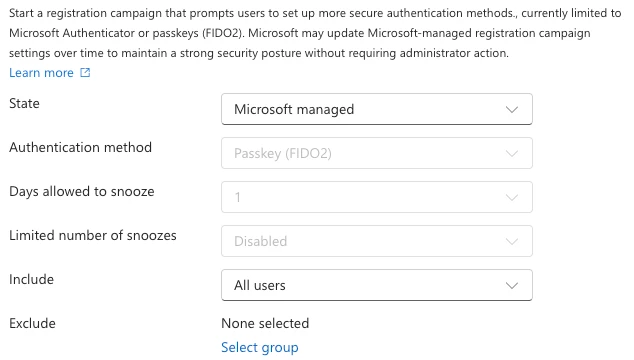
So a large population will meet a blocking, unplanned registration screen on a date published a year ahead. That is a good day to phone the same people. The cheapest defence is communications: tell users exactly what the registration prompt will look like and where it will come from, before the attacker tells them something else. I would treat the communications plan for a credential migration as a security control, because the attacker is already reading the schedule.
The temporary opt-out, passkeyDynamicMigration, runs from 1 September 2026 to 1 February 2027 and Microsoft says the February enforcement applies regardless. Deferring does not remove the event. It puts the whole deferred population into one day.
The first credential has nothing to verify it
Microsoft is also removing the step that used to come before a passkey. MC1450133, which I could read only through the Message Center mirror, says users with no registered MFA method will be able to register a passkey or passwordless sign-in as their first method, without setting up SMS or voice first. Microsoft updated the timeline on 26 October: Phase 1, covering synced passkeys, Entra passkeys on Windows and FIDO2 security keys, now starts in early November 2026 and completes in early January 2027. Phase 2, covering Windows Hello for Business, macOS Platform SSO and the Authenticator app, completes in late February 2027.
That is a sound change. It also means that for a password-only account, the only thing between a fresh session and a new phishing-resistant credential is whatever policy you have on registration, on top of the default MFA requirement for registering passwordless credentials, which a session captured after MFA has already satisfied. The notice's own recommendation is to review the Conditional Access policy on security information registration and consider requiring MFA to register.
Gate the registration, not only the sign-in
Conditional Access has a user action called Register security information, and Microsoft's page for it describes the model: treat registration like an application and use the full policy engine on it. The campaign documentation confirms the ordering, saying that Conditional Access policies governing security information registration "apply before the user is nudged". A policy that refuses the registration therefore also silences the nudge, which is what you want from an unmanaged session. Conditional Access, including the Register security information user action and authentication strengths, needs Microsoft Entra ID P1.
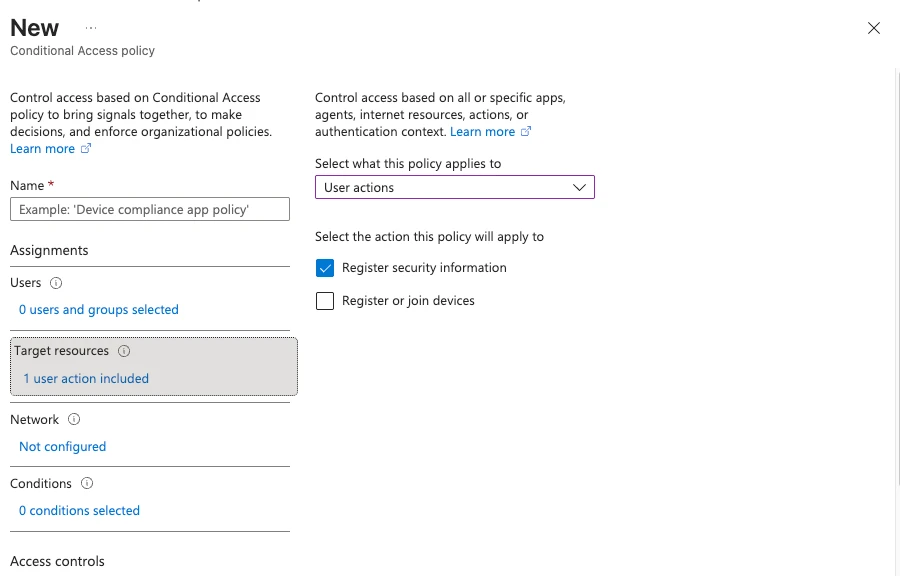
Three things on that page deserve a read before you build the policy.
First, the worked example requires multifactor authentication from users who are not on a trusted network, and excludes trusted locations. That is a design choice and not a requirement. If your trusted locations include a corporate VPN egress that a compromised account could reach, the exclusion is a hole.
Second, the example uses an authentication strength and the Temporary Access Pass to bootstrap new users, and the page notes that "Temporary Access Pass does not work for guest users". Guests need their own plan.
Third, a note near the top of the page says that from 6 July 2026, policies targeting Register security information will apply during Windows Hello for Business and macOS Platform SSO credential registration, which it says those flows did not evaluate before. The paragraph still says "Today, these registration flows don't evaluate" such policies, and the page's last-updated date is 29 May 2026, so I cannot tell from the page whether that is now in force.
Knight Office bound a Windows Hello key in August. If your registration policy is the control you are relying on, test a Windows Hello for Business registration against it in report-only mode and see what it does.
Microsoft's post points to the same family of controls. Its mitigations include enforcing phishing-resistant MFA ("FIDO2/passkeys, Windows Hello for Business") through Conditional Access, and Conditional Access that requires a managed, compliant device.
Watch the registration
The Entra audit activity reference lists the events to alert on. Under UserManagement: User started security info registration, User registered security info, User deleted security info, Admin registered security info, Admin deleted security info, Get passkey creation options, Add Passkey (device-bound) and Add Windows Hello for Business credential. Under Device: Add device.
The pattern worth finding is the one Huntress described: methods cleared, then a new one registered, within hours. This query looks for it in a Log Analytics workspace that receives the Entra audit logs. I have not run it against a tenant, so treat it as a starting point.
AuditLogs
| where TimeGenerated > ago(14d)
| where OperationName in (
    "User deleted security info", "Admin deleted security info",
    "User registered security info", "Admin registered security info")
| extend Target = tostring(TargetResources[0].userPrincipalName)
| where isnotempty(Target)
| summarize
    FirstDeleted = minif(TimeGenerated, OperationName has "deleted"),
    LastRegistered = maxif(TimeGenerated, OperationName has "registered")
    by Target
| where isnotnull(FirstDeleted) and isnotnull(LastRegistered)
| where LastRegistered > FirstDeleted and LastRegistered - FirstDeleted < 3h
A user who has just replaced a phone will match too. The difference is what the sign-in log shows around the same time, and whether the user can say they did it.
What to do before 1 February
- Build the Register security information policy in report-only mode now, with an authentication strength, break-glass accounts excluded, and a deliberate decision on trusted locations. Test Windows Hello for Business registration against it.
- Plan how new users and the SMS and voice population bootstrap. The built-in phishing-resistant strength does not accept a Temporary Access Pass: Microsoft's table lists the pass only under the built-in MFA strength. A registration policy that lets new starters in with a pass needs a custom strength that includes it, which Microsoft's own example calls "Bootstrap and recovery". That makes who may issue a pass, and on what proof, the real control.
- Write the user communication for the registration prompt before the prompt arrives, and tell users that IT will not ring a personal phone about it.
- Put the audit events above into detection, and add the device registrations:
DESKTOP-followed by eight hex characters from a hosting address is Huntress's rule of thumb, and they say the pattern is rare but not unique to this campaign, so confirm before deleting. - Check the service desk's process for "I have a new phone". An attacker's request sounds exactly like it.
What is verified, and what is not
I fetched these pages on 30 October 2026 and checked the quoted figures against them: the two Huntress posts (published 2 September and 22 October), the SMS and voice retirement page (last updated 23 September 2026), the registration campaign page (last updated 12 October 2026), the Conditional Access registration page (last updated 29 May 2026), the audit activity reference (last updated 4 September 2025, so it may lag; the activity names above were present), and Microsoft Security Research's post of 9 September. That post was read in a browser on 30 October 2026 rather than fetched, and the quotations above are checked against that reading.
Not confirmed at the primary source. MC1450133 is read through a Message Center mirror, because Message Center needs a tenant sign-in; the Phase 2 start date on the mirror contains an evident typo, so I have not quoted it. Huntress's two posts are vendor research on its own customer base and I have not reproduced anything in them. I have not run any query or policy in this post against a tenant.
Start with the first item: build the Register security information policy in report-only mode and see which of your registration flows it evaluates.
Get the next one by email
Long, specific write-ups on M365 architecture and security, worked out against real tenants rather than summarised from documentation. Sent rarely, and only when it is worth your time.