
sbd.org.uk
← No. 07
sbd.org.uk · No. 07
Abstract geometric illustration of a glowing policy scope circle with new nodes entering around it and one orange node sitting outside the boundary

Microsoft 365

Conditional Access: When 'All Users' Stops Meaning All Users

A Conditional Access policy can stay identical while what it covers or can ask for changes. Four documented cases, and the dated record that catches them.

By Paul Bentley10 min read

Identity controls that move under you · Part 4 of 5

On this page
  1. An exclusion that stops at the application boundary
  2. A population that "all users" does not reach
  3. A replacement that cannot be combined with authentication strengths
  4. A control due to retire, with no stated after state
  5. Why the page date will not warn you
  6. What I would do on Monday
  7. What is verified, and what is not

Open a Conditional Access policy that targets all users and all resources, with one exclusion you added on purpose. Read it carefully, as you would in a quarterly review. It says what you wrote, and nothing in it has changed since you last looked.

That is the problem. During 2026 Microsoft has changed, or announced a change to, what policies like that do, in four separate ways. Two change what a policy covers: an application it now reaches, and an account type it never did. Two change what a policy can ask for, or whether it still runs: a control whose replacement cannot be combined with an authentication strength, and a retirement with no stated after state. In three of the four the policy object does not change. In the third, migrating means editing the policy, and the edited policy is still valid. The export reads as correct in every case. What shifts is what the words in the policy refer to, or what they can still say.

One policy object, two datesPOLICY, DATE 1Users: All usersApplications: All resourcesExclude: Exchange OnlineSAME POLICY, LATER DATEUsers: All usersApplications: All resourcesExclude: Exchange Online=identicalexportWHAT IT COVERSAs intendedExchange Online is excludedAccounts in scope are usersWHAT IT COVERSDriftedAttachments app is now in scope;the Exchange exclusion does not name itAgent user accounts were never in All users
The export is identical on both dates. What the words refer to is not: the policy now reaches the attachments application, which the Exchange exclusion does not name, and agent user accounts were never in All users.

My claim is narrow. A Conditional Access policy tells you what you intended, not what it does today. Inclusions pick up new applications, and exclusions do not follow them. "All users" is defined so that new kinds of account sit outside it. A replacement control can lack a feature the old policy used, and a retirement can arrive without a stated after state. Every case below comes from Microsoft's pages or Message Center notices. I tested none of them in a tenant, and the last section lists what I confirmed and what I did not. A fifth case, baseline scopes enforcement, is the subject of the next post in this series.
28
sbd.org.uk · No. 07

An exclusion that stops at the application boundary

On 15 September Microsoft announced, in Message Center notice MC1472591, that Outlook attachments now run as their own internal application. The notice has been updated twice, most recently on 29 September, so the text below is the version in force today and not necessarily the one anyone acted on first.

Two routes put a policy in force on the new application. A policy assigned to the Exchange and Office cloud applications is inherited by the attachment application by default, which is the route the notice describes. A policy that targets All resources includes the attachment application directly, because it is a separate application and an exclusion that names Exchange Online does not name it. That second route is my reading of how All resources works; the notice states only the inheritance. Then comes the sentence that matters:

If you've intentionally excluded Exchange online from a policy, that exclusion doesn't carry over to attachments, so users in scope can reach their mail but will be blocked from downloading, previewing, or uploading attachments.

Read that as a policy author. You excluded Exchange Online from a policy for a reason, perhaps a shared mailbox scenario or an unmanaged-device exception. The policy has not been edited. The population of people it blocks has changed, and the change falls on the users you exempted from Exchange Online enforcement. Their mail still opens and their attachments fail, and when the notice was written there was no prompt to sign in again and recover. Microsoft listed that prompt as follow-up work. The scope is Outlook on the web and the new Outlook, and inline images count as attachments. Continuous access evaluation (CAE) is not supported for the new application yet.

29
sbd.org.uk · No. 07

To exclude attachments you target an application called OwaDownloadAttachments, and a service principal for it has to exist in your tenant first. That is a one-time step, and nothing prompts you to take it. Prefer not to exclude it. Excluding it from an All resources policy that requires MFA or a compliant device reopens the gap that policy closed: attachment download from unmanaged devices, with no continuous access evaluation. If you need the exclusion, cover the application with an equivalent policy of its own, which the notice allows.

The opening policy, All resources with a resource exclusion, is also in scope of the baseline scopes enforcement that the next post covers.

I read this notice through a community archive of Message Center, because Message Center needs a tenant login. The text is the archive's copy of Microsoft's. The archive keeps three versions, from 15, 23 and 29 September; the second changed the body and tags, and the third the body. Opening a past version needs a sign-in to the archive's comment service, which I did not make, so I have not compared the first version with the current one. Session, Not Sign-In uses the same notice for the missing continuous access evaluation; the point here is the exclusion.

My own Conditional Access baseline post has the human version of this. Its first mistake is a break-glass exclusion group that is missing from a policy someone added six months later. The mechanism there is a person forgetting. Here the policy set grew a new application without anyone adding a policy at all, and the exclusion did not travel.

A population that "all users" does not reach

Microsoft's page on Conditional Access for agents lists what is not currently supported, and the first item is the one that gives this post its title:

Policies scoped through the "Users" assignment don't apply to agent user accounts. This boundary applies whether the policy targets all users, selected users, groups, directory roles, or external users.
Microsoft, Conditional Access for agents

The previous post covers these accounts from the inventory side; this section is about policy.

An agent user account is a user object in the directory. It can hold a licence, a mailbox, a calendar and custom roles, and it can join groups, including dynamic ones, according to the agent user account page. It cannot hold a password or a passkey and it cannot sign in interactively, because it authenticates only with a token issued to its parent agent identity. Microsoft describes its permissions as typically similar to a guest's, with more capability for enumerating users and groups.

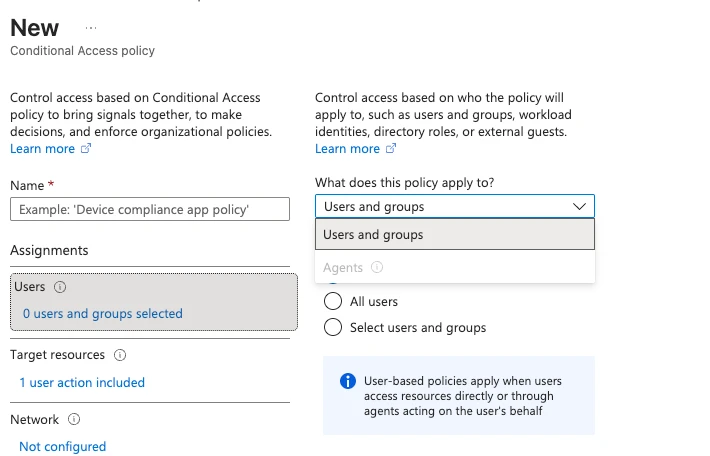
So a licensed, mailbox-holding principal exists in the directory, and a policy that says "all users" does not cover it. Scoping by group membership is listed as unsupported too. The page also says a policy that targets agent identities does not cover the agent's user account, and the reverse.

The fix is a separate target. Under the policy's users, agents or workload identities assignment, select Agents and then target all agent users or specific ones. That target needs a licence: Microsoft 365 E7, or a Microsoft Agent 365 licence with at least Microsoft Entra ID P1 or Microsoft 365 E3. A baseline written before the target existed still reads as covering everyone and does not.

Screenshot of the Users assignment in a new Conditional Access policy. The dropdown offers Users and groups, with Agents greyed out and unavailable.
A policy's Users assignment and its Agents target are separate choices. In this tenant Agents is greyed out because it needs an additional licence, so a policy built here can only reach people.

Two other lines on the same page set limits. Conditional Access does not apply when an agent reaches a resource with an API key, because that path never touches the Entra token pipeline, so close that path at the resource, not with a policy. And policies do not apply when security defaults are on. Neither is drift, but both limit what a policy covers.

30
sbd.org.uk · No. 07

A replacement that cannot be combined with authentication strengths

Conditional Access custom controls are the older route for sending a user to an external MFA provider. Microsoft's custom controls page says adding or editing them is not allowed from September 2026, with full retirement scheduled for early 2027. The route it points to for replacement is external MFA.

The external MFA method page is explicit about what the replacement cannot do:

Grant controls based on authentication strengths, including the built-in MFA strength, aren't satisfied by the external MFA method. Policies should only be configured with Require multifactor authentication.

This case is narrower than it first looks. A custom control and an authentication strength are separate grants, and I found no source saying a custom control ever delivered a phishing-resistant strength. The supported point is this. A tenant that wants a third-party factor and an authentication strength has to choose, and migrating a policy from a custom control to external MFA means editing it to Require multifactor authentication. So this case differs from the first two: the policy object does change, by the edit Microsoft's migration steps tell you to make. What drifts is what the policy can ask for. It can no longer say which kind of factor must satisfy it.

A migration that narrows what the grant can ask forBeforeGrant: custom control(external provider)custom controls: no add or editfrom September 2026, retire early 2027migrate to external MFA methodsAfterGrant: Require MFA;authentication strengthsnot supportedAuthentication strengths, including the built-in MFA strength, are not satisfied by the external MFA method.The policy can no longer say which kind of factor must satisfy it.
The replacement for custom controls cannot be combined with authentication strengths, so migrating means editing the policy. The export reads as valid in both states.

The export of the migrated policy is valid, and nothing in it records that a strength could not be combined with the method. Varonis Threat Labs described the trust involved in its TrustSink research, published on 16 September 2026: Entra accepts a signed token from a registered external method without checking what the provider showed the user. The attack needs a privileged account, so it is a post-compromise technique, and the design point stands without it.

What to check: keep phishing-resistant requirements on native authentication strengths, and do not migrate those policies to external MFA. For policies that still use a custom control, plan the edit before early 2027.

31
sbd.org.uk · No. 07

A control due to retire, with no stated after state

The legacy user risk and sign-in risk policies in ID Protection were due to retire on 1 October 2026. The concept page says they "are retiring on October 1, 2026" and the configuration page says they "will be retired on October 1, 2026". Both were fetched five weeks after that date and both are still in the future tense, with last-updated dates of 14 August and 28 April. Neither says what happens to a legacy policy that was not migrated: whether it stops enforcing, disappears, or stays visible and inert. The configuration page's migration section tells you to move to Conditional Access and disable the old policies, and does not describe what happens to a policy left in place.

I found no Microsoft statement that the retirement ran, so I will not say the policies stopped. What I can say is that the pages an administrator would consult have no description of the after state. From the portal, a policy that quietly stopped enforcing and one that still evaluates may look identical. Only a test sign-in with a risky signal tells them apart.

What to check: confirm that equivalent risk-based Conditional Access policies exist and are enabled, and do not rely on the legacy ones.

Why the page date will not warn you

You might hope to catch these by watching the documentation. The date is not a reliable signal. The agents page shows 30 September as its visible last-updated date, a page metadata date of 31 July, and an update timestamp of 7 October. The agent user page shows 11 June as its visible date and 30 September in the page metadata. These are three different answers to when a page changed. If you monitor Learn by its stated date, you are monitoring something that does not track edits.

What I would do on Monday

The defence is a dated record of what each policy covered, to compare against later. Start with the export, which takes minutes. It is read-only and needs only Policy.Read.All. The file holds raw object IDs, so store it as sensitive.

Connect-MgGraph -Scopes "Policy.Read.All"
 
$stamp = Get-Date -Format "yyyy-MM-dd"
 
$policies = Get-MgIdentityConditionalAccessPolicy -All
 
$rows = foreach ($p in $policies) {
    $session = @()
    if ($p.SessionControls.SignInFrequency.IsEnabled) { $session += "SignInFrequency" }
    if ($p.SessionControls.PersistentBrowser.IsEnabled) { $session += "PersistentBrowser" }
    if ($p.SessionControls.CloudAppSecurity.IsEnabled) { $session += "CloudAppSecurity" }
    if ($p.SessionControls.ApplicationEnforcedRestrictions.IsEnabled) { $session += "ApplicationEnforcedRestrictions" }
    if ($p.SessionControls.ContinuousAccessEvaluation.Mode) { $session += "CAE:$($p.SessionControls.ContinuousAccessEvaluation.Mode)" }
 
    [pscustomobject]@{
        Id               = $p.Id
        Name             = $p.DisplayName
        State            = $p.State
        ModifiedDateTime = $p.ModifiedDateTime
        IncludeUsers     = ($p.Conditions.Users.IncludeUsers -join ";")
        ExcludeUsers     = ($p.Conditions.Users.ExcludeUsers -join ";")
        IncludeGroups    = ($p.Conditions.Users.IncludeGroups -join ";")
        IncludeRoles     = ($p.Conditions.Users.IncludeRoles -join ";")
        ExcludeRoles     = ($p.Conditions.Users.ExcludeRoles -join ";")
        ExcludeGroups    = ($p.Conditions.Users.ExcludeGroups -join ";")
        IncludeGuests    = ($p.Conditions.Users.IncludeGuestsOrExternalUsers.GuestOrExternalUserTypes -join ";")
        ExcludeGuests    = ($p.Conditions.Users.ExcludeGuestsOrExternalUsers.GuestOrExternalUserTypes -join ";")
        IncludeApps      = ($p.Conditions.Applications.IncludeApplications -join ";")
        ExcludeApps      = ($p.Conditions.Applications.ExcludeApplications -join ";")
        ClientAppTypes   = ($p.Conditions.ClientAppTypes -join ";")
        GrantControls    = ($p.GrantControls.BuiltInControls -join ";")
        GrantOperator    = $p.GrantControls.Operator
        CustomControls   = ($p.GrantControls.CustomAuthenticationFactors -join ";")
        AuthStrength     = $p.GrantControls.AuthenticationStrength.DisplayName
        SessionControls  = ($session -join ";")
    }
}
 
$rows | Export-Csv -Path "ca-coverage-$stamp.csv" -NoTypeInformation

That records what the policies say. It does not record what they cover, so beside the file write the coverage in plain words for your three broadest policies: which applications, which kinds of account, which clients. Then do six things with it.

  1. Read every policy that has an application exclusion and ask whether it names a parent application that has gained a child. Exchange Online and the Office cloud applications are the case above. If a policy excludes OwaDownloadAttachments, check that another policy covers that application.
  2. Read every policy meant to cover everyone and decide whether agent user accounts are in scope for it. If they are and you hold the licence, add the agent users target deliberately, in report-only mode first. Without the licence, inventory the agent user accounts as the previous post describes, and keep a sign-in log query on them.
  3. Subscribe to Message Center, or its archive, and read notices about new application identities and new principal types as scope changes. Ask of each one what inherits, and who told you.
  4. For any control that has been migrated or retired, test with a dedicated test user and device, never a break-glass account. Run the What If tool first, then make the sign-in that should fail and check the Conditional Access tab of the sign-in log to confirm it did. Do not rely on the policy list for this.
  5. Keep your break-glass exclusions. A scope review must not remove them, and every new policy needs them.
  6. List the policies that use a custom control, using the CustomControls column, and plan their migration before early 2027.
32
sbd.org.uk · No. 07

I have not run the script above against a tenant. It parses cleanly in PowerShell, and the property names follow the Microsoft Graph PowerShell module's policy object, but check the output against your own tenant before you rely on it. It has no field for the agent users target, so check that one in the portal. It records guest and external user types but not which external tenants.

What is verified, and what is not

I read each source below on 8 November 2026. A source marked as an archive copy is a community mirror of Message Center, not Microsoft's own page.

  • MC1472591, the Outlook attachment notice and the quoted sentence: confirmed, archive copy, current version last updated 29 September. The archive lists three versions, but opening past versions needs a sign-in, so the first version was not compared with the current one. The OwaDownloadAttachments application and its one-time service principal step are in the current text.
  • Conditional Access for agents: confirmed at Microsoft Learn, including the quoted statements, the API key clause, the security defaults clause and the unsupported group scoping. It documents the Agents target for all agent users, and its licensing.
  • The agent user account page: confirmed at Microsoft Learn, including the licence, mailbox, group, role, credential and guest-like permission claims.
  • The external MFA method page and the custom controls page: confirmed at Microsoft Learn, both quotes present.
  • The ID Protection pages: confirmed, with the future tense still in place. The retirement itself is unconfirmed, and no source describes the behaviour afterwards.
  • The baseline scopes page: confirmed at Microsoft Learn, 8 October.
  • The Varonis TrustSink research: read on varonis.com. It supports the statement about the signed token and the privileged account, and nothing more is claimed from it.
33
sbd.org.uk · No. 07

Not done: no test in a tenant of any behaviour above. In particular I have not confirmed that an agent user account escapes an all users policy in sign-in logs, or what a legacy risk policy does after 1 October. I have not compared the first version of MC1472591 with the current one.

34

Get the next one by email

Long, specific write-ups on M365 architecture and security, worked out against real tenants rather than summarised from documentation. Sent rarely, and only when it is worth your time.