
sbd.org.uk
← No. 07
sbd.org.uk · No. 07
Abstract geometric illustration of three identical document cards with ticks, the connections beneath the third shifted out of line with one strand glowing orange

Microsoft 365

What an Unchanged Policy Export Does Not Prove

A Purview or Entra policy export can stay identical while Microsoft changes what it covers. Four cases, and what to record to prove behaviour.

By Paul Bentley9 min read

Identity controls that move under you · Part 5 of 5

On this page
  1. Two Purview changes in opposite directions
  2. A policy that may never have looked at a file type
  3. A group that stops updating
  4. One paragraph on Conditional Access baseline scopes
  5. The notice that was retracted
  6. What your snapshot can and cannot see
  7. What to do about it
  8. What is verified, and what is not

Here is the evidence pack. For each control you attest to, there is an export of the policy object, or a screenshot of the portal setting, dated and filed. The auditor opens it, sees the setting enabled and the scope listed, and ticks the line. Next quarter you export it again, the two files match, and the line is ticked again.

The matching files tell you the object did not change. They do not tell you the control did not change. Between mid-September and the end of October Microsoft has announced changes to what at least four settings cover, evaluate or do, and in none of them does the object you would export need to differ by a character.

An attestation built from a policy export proves that the setting exists. It does not prove what the setting does today. The defence is a dated record of what each control covers, in plain words, and a habit of reading Microsoft's change notices as a feed of control changes.
The same export, three datesEXPORT, DATE 1policy objectidenticalWHAT IT COVERSDLP: CopilotRetention: Teams and CopilotEXPORT, DATE 2policy objectidenticalWHAT IT COVERSDLP: Copilot and CoworkRetention: Teams and CopilotEXPORT, DATE 3policy objectidenticalWHAT IT COVERSDLP: Copilot and CoworkRetention: Teams onlyMC1477182 widens DLP to Cowork (date 2). MC1481313 drops Copilot from Teams retention (date 3).An attestation built from the export proves the setting exists, not what it does today.
The export is the same on all three dates. The Message Center notices between them change what the DLP and retention policies cover, and nothing in the export records it.
35
sbd.org.uk · No. 07

Two Purview changes in opposite directions

The first is a widening. Message Center notice MC1477182, published on 22 September 2026, extends Purview Data Loss Prevention to Microsoft Cowork. The notice says:

existing DLP policies that target the Microsoft Copilot workload will automatically apply to Microsoft Cowork
Message Center MC1477182, via mc.merill.net

No separate configuration is required. Microsoft's own compliance table answers yes to whether the change modifies DLP policy enforcement.

Read that as an auditor would. Your DLP policy targets the Copilot workload, it has done since you wrote it, and the export you filed in September is the export you would file in November. The policy is the same and the set of things it governs is larger. If your attestation says "DLP blocks prompts containing card numbers in Copilot", it is now true of a second product that the statement never mentioned. That is probably a good outcome. It is still a change to what you are attesting, and nothing in the export records it.

The second goes the other way. Notice MC1481313, published on 28 September, says that legacy Teams retention policies which currently also apply to Microsoft 365 Copilot interactions will be treated as Teams-only. Copilot interactions will no longer be retained or deleted through them, and anyone who needs retention for Copilot has to configure a policy for that workload. Microsoft's compliance table answers yes to whether the change modifies retention policies, and it says the Teams behaviour is unchanged.

Here the policy object again stays as it is. Its name, its retention period and its Teams locations are all the same. What drops out is a workload that your retention schedule may have been quietly covering, and a retention period that was part of your answer to a records question will simply stop applying to it.

36
sbd.org.uk · No. 07

The rollout date for that second change has moved. The notice first said late October. On 28 October Microsoft updated it, and when I read it on 30 October it said the rollout begins in mid-January 2027 and completes by the end of January. The archive tracks two versions in total. The date moved and the behaviour did not. If you are planning around it, plan around the behaviour.

A policy that may never have looked at a file type

The third case is quieter. Notice MC1530948, published on 29 October, adds support for legacy Office formats, .doc, .xls and .ppt, to service-side auto-labelling in SharePoint and OneDrive. New policies pick the formats up automatically. Existing policies do not: Microsoft's instruction is to make a small edit, such as adding or removing a comment, save it, and run the policy again to restart the crawl. The preview begins in early November and general availability in late November, according to the notice.

Read between the lines of that instruction. An existing policy needs a restart to evaluate those formats because it did not evaluate them before. The notice does not say that in terms, and I have not seen a coverage report to check it against, so treat it as my reading and not as Microsoft's statement. But if it is right, then every auto-labelling policy you have is, today, a policy that has never looked at a legacy Office file. The policy is enabled. Its scope lists the right sites. Its simulation results were clean. An old .doc in a SharePoint library has been outside all of it, and the setting gave you no way to tell.

I do not know whether the Purview coverage reports distinguish a file that was evaluated and not labelled from a file that was never evaluated. That is the question to put to your own tenant, because the answer decides whether you can ever see this class of gap from the inside.

A group that stops updating

The fourth is dated, which makes it useful. Microsoft's documentation for the memberOf operator says that after 3 November 2026, dynamic membership groups, dynamic administrative units and entitlement management auto-assignment policies that use the operator "stop updating and remain in their last known state". The page lists what that can leave stale: Teams and SharePoint access, Conditional Access targeting, group-based licensing and access package assignments.

The group exists after 3 November. Its rule is unchanged and reads as valid. It just no longer moves, so a leaver stays in it and a joiner does not arrive. The page is also clear that the operator is a preview feature and "isn't intended for production use", which is fair, and which is not a reason to assume nobody built something on it. I have no way of knowing from outside a tenant, and the page says nothing about whether the audit log or the dynamic group processing status will tell you a group has frozen. Check before you assume it will.

37
sbd.org.uk · No. 07

One paragraph on Conditional Access baseline scopes

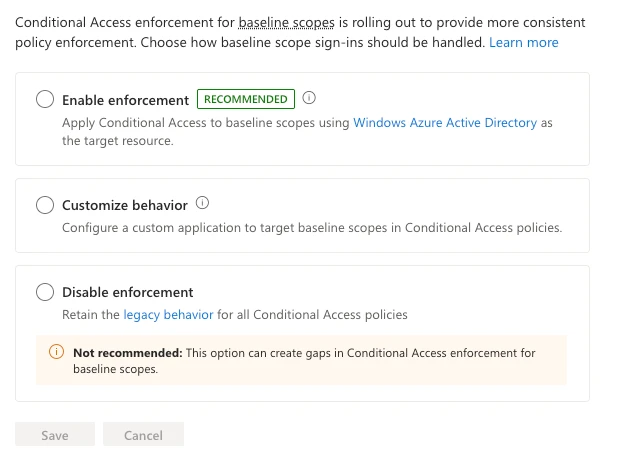
A fifth case sits in Conditional Access, and the previous post left it for this one. Since 15 June 2026 Microsoft has been rolling out, progressively, evaluation of sign-ins that request only baseline scopes on policies that target All resources and carry a resource exclusion, where previously those scopes were excluded. A tenant that chose Disable enforcement or Customize behavior in the baseline scopes settings keeps the old behaviour for the policies it chose. Microsoft's enforcement page was updated on 8 October and now carries a Graph query that lists the affected policies, plus a per-policy way to keep the legacy behaviour using a placeholder application. The policy JSON you exported in May was correct then and describes a different enforcement now.

Screenshot of the Conditional Access baseline scope enforcement settings with three options: Enable enforcement (recommended), Customise behaviour, and Disable enforcement, which carries a warning that it is not recommended.
The Baseline scope settings: enable, customise per policy, or disable, which Microsoft marks as not recommended. The choice changes what an unchanged policy evaluates.

The notice that was retracted

One more case belongs here as a warning about method, not as an instance. A Message Center notice about Teams file sharing in external chats, MC1479514, was first summarised as saying that the default would change from Disabled to Enabled "even if your organization previously configured the setting as Disabled". That is the strongest form of the claim in this post, a vendor overwriting a setting you chose. At its current version, which is the fifth, the notice no longer says it. It applies to tenants that left the setting at its default, it says an explicit Disabled is respected, and the rollout dates have been withdrawn. Its 15 October update did add one actionable line: "Please update your settings by the first week of November".

Microsoft shows only the current version of a notice. The community archive I read keeps the history, and its per-version links returned the current text when I tried them, so I could not recover the original wording myself. The consequence is the useful part. If you recorded the text on 25 September, you are holding a claim the vendor has since retracted, and if you did not, you cannot prove what it said. A record of what a notice said, with the date you read it, is evidence in a way that a link to the notice is not.

38
sbd.org.uk · No. 07

What your snapshot can and cannot see

I run a nightly configuration snapshot of a developer tenant, the pattern described in Configuration as Code for Endpoint Management. In its first runs it returned five resource types and 35 resource instances.

I reverted two settings types by pull request, with the tenant read-back matching the baseline file after normalisation. That is a real answer to configuration drift: someone changes a setting, the snapshot diff shows it, and the change is reverted from the repository.

It is blind to every case above. A snapshot of an unchanged object is identical before and after a vendor-side change, which is the whole point. The DLP policy file is the same on the day Cowork is added. The retention policy file is the same on the day Copilot drops out. If the detection of drift in your estate is a diff of exported objects, you have detection for one of the two kinds of drift and none for the other, and the second kind is the one the auditor cannot see either.

What to do about it

  1. List your dynamic groups that use memberOf. After 3 November 2026 they stop updating and stay in their last known state, so replace the rule, convert the group to assigned membership, or accept the freeze per group: a frozen Conditional Access exclusion group keeps its last members exempt, and a frozen target group stops covering joiners.
  2. Beside each dated export, record in plain words what the control covers: the workloads, the file formats, the scopes, the group sources. Two sentences per control are enough. The point is to have something a notice can contradict.
  3. Treat Message Center as a change feed for those records. Each notice that mentions a service you attest to gets read against the record, and an entry that no longer holds gets a dated correction. Keep the text you read, with the date, because Microsoft will not keep the earlier version for you.
  4. For each classification, retention or access control, ask what it has evaluated and how you would know. For auto-labelling, that means finding out whether a coverage report separates unlabelled from unevaluated. For a dynamic group using memberOf, it means finding out what, if anything, tells you it has stopped.
  5. Run the Graph query on Microsoft's baseline scopes page against your own tenant. It is the one case here where the vendor has published a way to find the affected policies, and it is a good habit to look for one each time.

What is verified, and what is not

I fetched the two Microsoft Learn pages cited above on 30 October 2026. The memberOf page was last updated on 5 August 2026 and says what is quoted. The enforcement page was last updated on 8 October 2026 and contains the Graph query and the placeholder application setting. Both are primary sources.

The four Message Center notices are mirror-verified, not verified at primary. I read them on 30 October through mc.merill.net, a community archive, because Message Center needs tenant authentication and I did not read them there. MC1477182 and MC1530948 show a publication date and no revision. MC1481313 shows a last-updated date of 28 October and two versions. MC1479514 shows a last-updated date of 15 October and five versions. I did not re-fetch the earlier Message Center notice for the baseline scopes change, and I did not read the notice behind the memberOf date, so its history is unchecked.

I have not read any of this from a live tenant. Whether the Purview interface or Get-RetentionCompliancePolicy shows the effective scope change, whether coverage reports separate "not labelled" from "not evaluated", and whether the Entra audit log surfaces a frozen group are open, and I have not tested any of them. Where I have read between the lines of a notice, I have said so.

Start with the two sentences per control from the second item: the post is only useful once you have something a notice can contradict.

Check the pages themselves before you act on this post. They are the part that moves.

39

Get the next one by email

Long, specific write-ups on M365 architecture and security, worked out against real tenants rather than summarised from documentation. Sent rarely, and only when it is worth your time.